Showing posts with label Windows. Show all posts

Oracle iSQLPlus

Sqlplus.exe and sqlplusw.exe are the conventional interfaces used to query against the Oracle Database.iSqlPlus is the browser based interface that doesnt require any installation on the machien to query the database.To know the port numbers at which isqlplus and Enterprise Manager Console are running look into the portList.ini file located in ..\db_1\install folder.
For example
iSQL*Plus HTTP port number =5560
Enterprise Manager Console HTTP Port (orcl) = 1158
Enterprise Manager Agent Port (orcl) = 3938
Here isqlplus runs at 5560.To acces it.. http://OracleServerMachienName:5560/isqlplus
If this doesnt work check if the isqlplus service is Up under the Windows Services[Services.msc]

Capturing Microsoft Crash Dump

Steps to capture the Microsoft Crash Dump
Pre requisite
Machine should have 'Debugging tools for Windows' installed.If not download and install from this location : http://www.microsoft.com/whdc/devtools/debugging/installx86.mspx
Note:The above package will install windbg.Note the path of windbg.exe.we will use this to capture the crash dump
Steps
1]Open the Registry using Regedit
2]Open the following key "HKEY_LOCAL_MACHINE\SOFTWARE\Microsoft\Windows NT\CurrentVersion\AeDebug"
3]Take the backup of the AeDebug regisrty key.This is to restore the original settings once the crash dump is captured.
4]To take backup, right click on 'AeDebug' and select 'Export' option.Specify the name and location to store this.
5]Now set AeDebug\Auto key to 1
6]Set AeDebug\Debugger key to 
"" -p%ld -e%ld -g -c ".dump /mfa C:\\dump %ld.dump:q"
7]Try to reproduce the issue.On crash windbg will start and generate the crash dump file at C:\ location.
8]Restore the original settings by double clicking the file exported earlier in step 4

Safari Browser for Windows

Mac users do not need intro to the term Safari.Now the fastest browser on Mac is available for Windows users also.Apple Team says, Safari is capable of loading the web pages upto twice as fast as IE and upto 1.6 times faster than Firefox 2.The safar 3 which is in Public Beta now can be downloaded here

Windows XP : Turn off Unnecessary services

Here is a very good article on how to improve performance for your Windows XP machine by turning off some of the services that are not required.This will be especially useful if you have hardware limitation with Primary memory,processor etc.,Go through the article and decide which one's suit your PC.
Article

Tabs list

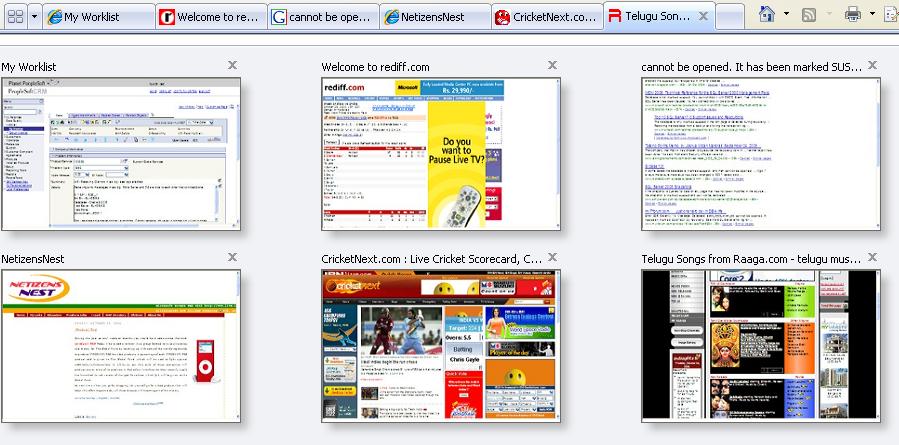
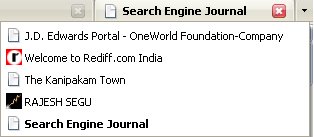
IE7 and Firefox 2.0 have come up with a new fancy feature to look at the list of all the opened tabs in the current browser Window.IE7 organised all the tabs in a miniature form in grid format.Firefox just lists them in text format at the right end of the tab bar.

Windows Vista Beta2 CD

Answer the following easy to answer 8 questions and win the Windows Vista Beta2 CD.As this "Future Assured Quiz" is being hosted by none other than the mighty windows its for sure we gonna get it , if we answer all the questions correctly.
I gave my try and the following text appeared on my screen.
"Thank you for taking part in the Microsoft Future Assured Quiz.Your copy of Windows Vista Beta 2 CD will be dispatched shortly."
So Give your try now at Win a Vista

End of Road for win 98

11 July 2006 will be marked as an important date in the history of Microsoft , as it is stopping the support for its most popular kid Windows 98.It means to its 70 million users it no longer fix bugs, provide telephone support and provide security patches.The product which was launched 8 years ago has been the beloved kid for Bill.Though its stopped selling it after the launch of Windows XP, it continued to provide support till today.Now Microsoft has decided to cross-mark it and it should have already alarmed its customers to upgrade to safer OS,XP.Most importan part of the support I feel will be security Patches from the Microsoft , because all other bugs should already have been fixed and customers may not worry about this.If the customers do not connect to WWW, which is primary door for the malicious programs to get in , they need not worry.Other versions that also come under this end of support as part of the Microsoft Lifecycle Policy are Windows 98, Windows 98 Second Edition,and Windows Me.However the documents and other content related to the self-service and bugs will be continue to be available in the microsoft website for few more years.
http://support.microsoft.com/gp/hublist
Also alarmed the End of support for Windows XP Service Pack 1.
For this October 10 ,2006 has been set as the target date.All users using SP1 can upgrade tp SP2 for free.Here is the link for it http://www.microsoft.com/windowsxp/sp2/default.mspx

For the complete story read here

IE7 Beta 2

All the much awaited release of IE7 Beta 2 is out now.Here is the link to have a tour of the features and download the same.The Beta1 release that happened few months back probably helped the dev team in fixing some of the issues.I see all the promised features Viz tabbed browsing,Rss feed support,Side search providers similar to engines you get in firefox ,new look and ofcourse security stuff.
so test try now here

Sun Google

Seems the alliance between Sun and Google formed down last year started working.Today I got a notification with some Java updates , and when I proceeded , came across the following window.
Okay ...Google got the benifit ..... But what does Sun get from Google..any idea?..

online Office

Thanks to the Teams at Google and Yahoo for bringing many interesting and new services to the web that are making web one of the most profitable businessess now-a-days.Understood this lately,Microsoft is entering into this market promising online services that are gonna add more ease and charm to the web.It has started some of the services that are online counterparts of Office and Windows...
Have a look at them..
1)Live.com
2)OfficeLive

Windows Vista Screen Shots

Wanna see how the upcoming windows vista look like?, then go here or here

Intenet Explorer 7

After several years of drought for an explorer from the microsoft stable, all is set for the release of the next version of IE.Although it was said IE 7,the next version will be available only with Windows Vista,later it came down to XP SP2 too.The IE7 beta is expected to release this summer.Going through some of the features....

Visual Enhancements
Tabbed browsing ,that enable users to browse and manage multiple sites in a single view.The problem with multiple browser windows is that it consumes lot of space on the task bar and often irritates users in browsing.

Toolbar Search Box ,This is a small box that lies at the Top-Right end of browser.I think it is similar to the Search engine tools available with Mozilla FireFox browser.
Cleaner Interface ,the menus and address bar,standar Buttons etc., are rearranged keeping easy accessibitly in mind.
Apart from these Shrink-to-Fit Printing,RSS Feed Support,Auto Web Feed Detection etc , etc are promised to be in visual enhancements.

Security Enhancements
Acording to Answers.com Phishing is
"Pronounced "fishing," it is a scam to steal valuable information such as credit card and social security numbers, user IDs and passwords. Also known as "brand spoofing," an official-looking e-mail is sent to potential victims pretending to be from their ISP, bank or retail establishment. E-mails can be sent to people on selected lists or on any list, expecting that some percentage of recipients will actually have an account with the real organization."
Example of a Phishing incident here
If you come accross any such incident please report it to www.antiphishing.org at here.

To know more about the new way Internet Explorer 7 protects against fraudulent websites and how anti-Phishing works ping here and download Anti-Phishing White paper.

Desktop Search , Forget whats in your Computer !

The desktop software giants Microsoft,Yahoo and Google are locking their horns frequently these days to get a major pie in the market.Be it Email,Search,Groups,Blogs,Sky search,Auctions they are competing heavily to develop more effective,more beautiful products.Recently the war extended to Desktop Search"

Logic goes like this:As soon as you install the Desktop Seacrh application ,it will prepare an index for the all the files located in your computer when your system is idle.The Desktop Search application will be running in background continuously looking for new files to index.Then how is it different from conventional "Windows+F" search. Conventional search goes through all the files each time you search(fewer indices) . Desktop Search apps will use the created index at the time of your search.

I have been using both Yahoo and Google DS apps for more than 2 months.I found Yahoo DS is better over the three in many aspects:
1)YDS lets you do more confined/Specific search like (Images/Emails/Outlook/PDFs/Music etc) which GDS doesnt.
2)The preview on the right pane lets you peer in to the file without opening it(Others doesnt)(Really Good).
3)The main difference I found is suppose you had a file"ABC.html" ,but now you don't.GDS still displays it.YDS lets you delete the entry from the index(Obvously Cool feature).

Tips:
1)Do not enable indexing on your Outlook/IM/Emails , that spoils your privacy.
2)Disable splash in YDS : For Quick launching.

One greatest threat I found from these is "Index".For the entire computer,an index will be generated and kept in one location.If hackers manage to get the index,thats it.Some sort of encryption needs to be done to prevent such a misdeed.If they manages to do this,desktop search will really become joyfull,because we need not remember any thing.

I havent done much research on one by Microsoft,but heard like Microsoft Vista is going to come with this desktop search tool.
TestTry them.My vote is for YDS.

Dowloads

Microsoft Re-christens its latest baby:Windows Vista.


CodeName ---> Market Name:
After 5 long years of major launch ,Microsoft is all set to launch its much publisized LongHorn in Aug 2006.In that direction it came out with the naming ceremony on 22 nd this month re-christening LongHorn “Windows Vista” with tagline
"Clear, Confident, Connected; Bringing clarity to your world".

Vista:
A quick look at the meaning of the word form Answers.com says :
n. 1. a. A distant view or prospect, especially one seen through an opening, as between rows of buildings or trees.
b. An avenue or other passage affording such a view.
2. An awareness of a range of time, events, or subjects; a broad mental view: “the deep and sweeping vistas these pioneering critics opened up” (Arthur C. Danto).

The stress is on “
Distant View”.Microsoft is promising with its new OS cutomer can focus only on what he want want and nothing else.

LSB1(Longhorn Server Beta1) :Beta 1 is not for general users:
The first beta version of the software is heading towards IT professionals and developers on August 3.
. Some new features in the OS include security improvements, new graphics, and a new means of searching and organizing information. The use of virtual folders will prevent users from having to remember the single folder where something is stored.
.The "look and feel" will come in the second beta(LSB2).
.Vista has been designed with security as "part of the design, not a bolt-on".
The purpose of the first beta, according to Microsoft, is to give developers the ability to begin developing drivers and apps for the new OS.

The final product will be released in the August 2006, which will be preceded by at least one release candidate (RC) and a second beta, which is rumored to become available sometime in November of this year.
Links more info:
1.windowsvista
2.Video of Naming Ceremony
3.The Name "Vista" Gives Microsoft Headaches
4.
Windows Vista Beta 1 Is Already Available on internet

Top