Showing posts with label Database. Show all posts

SQL Server 2005 Driver Signer Issue Websphere 6

If you are facing the following issue while using SQL Server 2005 JDBC driver in websphere 6 : "java.lang.SecurityException: class "com.microsoft.sqlserver.jdbc.SQLServerConnection "'s signer information does not match signer information of other classes in the same package"
here is the work around link

Stored Procudure to insert a set of records with a just one Column value being

Use the following stores Procedure to insert


CREATE procedure sp_insertBulk
as
-- SETUP RUNTIME OPTIONS / DECLARE VARIABLES --

declare @count int


SELECT @count=100
while (@count < 900) begin


INSERT INTO DV812.DBO.F00950 VALUES ('4','IC9017642','*ALL','MCU',' ' + convert(varchar,@count),
' ','CostCenter',' ',' ',' ',' ','Y','Y','Y','Y',' ' + convert(varchar,@count) ,
0,' ',' ',' ',' ',' ',' ',' ','IC9017642','EP00950','DENDS040',107234,72943.000000,0,0,0,' ')

SELECT @count =convert(int, @count) +1
end
GO


'SPACESHERE ' + convert(varchar,@count) is concatenating Spaces and the varchar equivalent of the count variable

Oracle iSQLPlus

Sqlplus.exe and sqlplusw.exe are the conventional interfaces used to query against the Oracle Database.iSqlPlus is the browser based interface that doesnt require any installation on the machien to query the database.To know the port numbers at which isqlplus and Enterprise Manager Console are running look into the portList.ini file located in ..\db_1\install folder.
For example
iSQL*Plus HTTP port number =5560
Enterprise Manager Console HTTP Port (orcl) = 1158
Enterprise Manager Agent Port (orcl) = 3938
Here isqlplus runs at 5560.To acces it.. http://OracleServerMachienName:5560/isqlplus
If this doesnt work check if the isqlplus service is Up under the Windows Services[Services.msc]

CCSID

The data in the DB2 will be coded in some CCSID format.It needs a conversion for proper display when viewed on a different m/c.
For example for the data to be visible in English : CHGJOB CCSID(37) command should be run at the command prompt.Based on the language in which you would like to view, appropriate CCSID should be used.
The picture show the data displayed from a table before running the command CHGJOB CCSID(37).
  • CCSID stands for Coded Character Set ID.
  • A CCSID of 65535 means the data is coded in Hex


Some times you may get "SQL0332 - Characterconversion between CCSID &1 and CCSID &2 not valid".Refer this for more information SQL0332
Use full links related to CCSID here here


MSDE- Microsoft SQL Server Desktop Engine

MSDE - Microsoft SQL Server Desktop Engine, is a Free,light weight, re-distributable DataBase from the Microsoft.It is a less-featured version of the Microsoft SQLServer 2000 which is free to use for non-commercial use.For commercial use, one need to register with Microsoft [Most probably in this case also it can be destributed free of cost].The first restriction the MSDE comes in the form of size of each DataBase.It is set to a maximum of 2GB.Next it doesnt provide any graphical interface to administor the database and there are performance restrictions as well.For Students,website developers and programmers it is a perfect
choice.In Microsoft's words

MSDE 2000 is a royalty-free, redistributable database engine that is fully compatible with SQL Server. MSDE 2000 is designed primarily to provide a low-cost option for developers who need a database server that can be easily distributed and installed with a value-added business solution.

How to know whether you have MSDE installed in your machine or not.
To check it go to your Control Panel->Add or Remove Programs and check if you can see something like the one shown in the below snapshot.

Table Indices

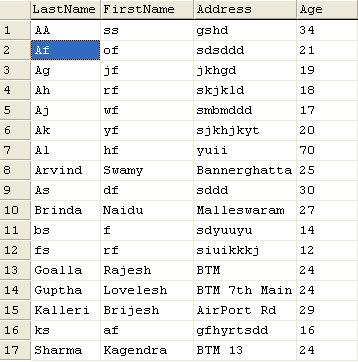
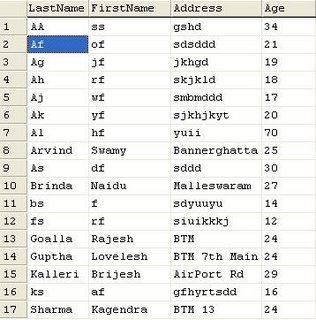
Consider the sample Table empTable and a select * from empTable fetched me the following results. It shows the rows are organized by the LastName column. For information, LastName is my Clustered Index key. For now this is the only index I have on this table.
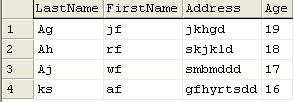
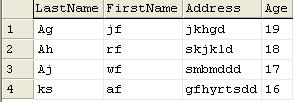
Now Issue the following query "select * from emptable where age BETWEEN 16 AND 19".This will fetch me the following data.
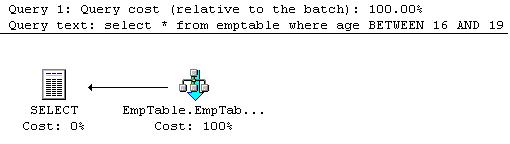
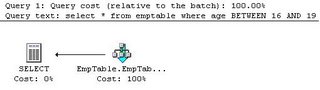
But the point of concern here is performance and the usage of indices.To knows it I enquired for the estimated execution Plan.

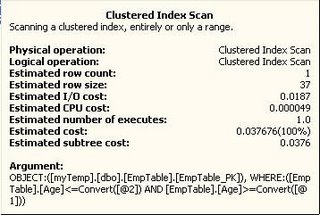
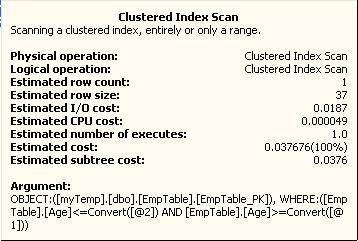
It shows as below: Here it is scanning the table which is organized by the Clustered index. This is very much similar to table scan. The cost field shows 0.03767 units.


With an Index on Age field

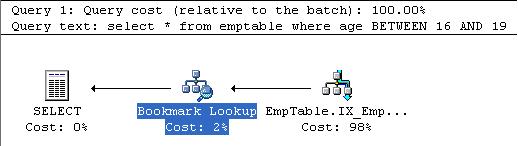
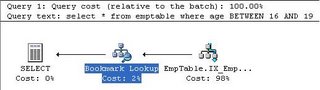
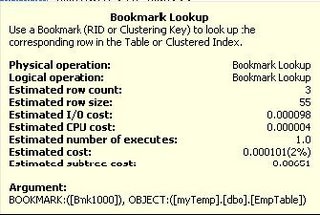
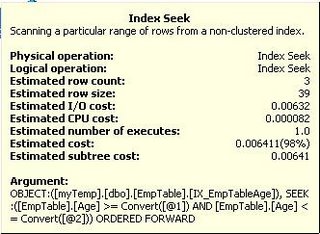
Try to create an index on the column Age. Issue the previous query again, now, the estimated execution Plan is shown as below. It is split into to two tasks
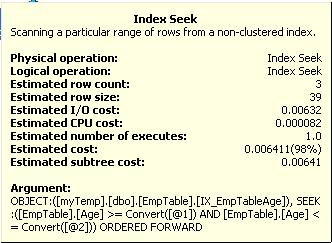
1) Index Seek
Index seek goes through the Index structure which we created for the column and notes down the ROWIDs or Clustering Keys of the rows in table matching the selection criteria.
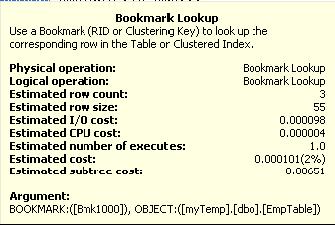
2) BookMark Lookup. Uses this ROWIDs or Clustering Keys to fetch the actual row in the table.
The cost field shows: 0.00651 units.


How it works

When the query is passed to the database, based on the columns in the WHERE clause fields are compared against existing indices. In our case the WHERE clause contains the age and it matches the just now created Index. So it is should be selected.

The index structure will usually be some variant of B/B+ tree, with each node contains a pointer called ROWID or Clustering Key pointing to the physical location of the row in the table. This pointer can be used during the BookMark Lookup phase to fetch the row.
Obviously going through the Tree structure is quicker compared to scanning the entire table. Hence using indices will improve the performance.